Kajabi Alternatives: Compare Costs and Course Structure
Compare Kajabi alternatives by real cost, module structure, pacing and assessments, with a table of options and a step-by-step course framework.
Popular advice says to choose the Kajabi alternative with the closest feature list, or the lowest monthly price. Neither is a reliable way to decide. The better test is whether the platform can deliver the course you've designed, then what it costs after sales fees, email limits, and the tools you still need are included.
Start with the product and learner experience: a downloadable ebook doesn't need the same structure as a course with timed lessons, quizzes, and live feedback. Then compare the annual bill at a realistic sales volume. That gives you a shortlist based on fit and economics, not a demo screen.
Kajabi Alternatives Compared at a Glance
| Platform | Best fit | Course structure tools |
|---|---|---|
| Genesize | Ebooks, courses, and funnels in one workspace | Ebooks, courses, and resources with editing and layout tools |
| Teachable | Standalone course sites | Modules, lessons, quizzes, assignments, drip scheduling |
| Thinkific | Course sites with memberships | Structured courses, quizzes, and progress tools |
| Podia | Hosted courses, downloads, and community | Course content and downloadable products |
| Circle | Community-led courses and memberships | Courses organized alongside community spaces |
| Ruzuku | Cohort and course-led businesses | Course lessons and cohort delivery |
Use the table as a shortlist of candidates, then check what each charges. Vendor pricing, plan limits, and transaction terms change often, and a Kajabi alternatives cost comparison places entry plans across the market from free to roughly $89 per month, with platform transaction fees between 0% and 10% depending on the platform and plan. Confirm current fees on each vendor's pricing page before you commit to a budget.
Genesize combines product creation, a storefront, checkout, sales funnels, email marketing, customer management, and AI Growth recommendations in one workspace. The storefront comes on every plan, and the subscription covers the software rather than a cut of sales. There is no permanent free plan, so the 14-day trial is the entry point, and a payment method is required to start it. Buyers access what they purchase without needing a Genesize plan of their own.
Three questions narrow the list:
- What are you selling? A single ebook or workbook needs a clean purchase and delivery path. A self-paced course needs a clear way to organize and release lessons. A live cohort may need scheduled access and tools for discussion or feedback.
- How should learners move through it? Decide whether buyers open everything at once, whether content releases over time, and whether learners need quizzes, assignments, or a community alongside the lessons.
- Do you need email follow-up included? If follow-up is part of the sale and onboarding, check whether the plan includes campaigns, customer tags, and automation at a price you can afford.
Pick two or three candidates that fit, then test the course structure and full purchase path before deciding.
What Each Option Costs Once Sales Start
A $2,000 month can make a cheap plan expensive. Across entry plans in this Kajabi alternatives cost comparison, advertised starting points run from free to roughly $89 per month, with platform transaction fees from 0% to 10% depending on the platform and plan. The subscription is the visible number. The fee rate decides whether it stays cheap after checkout.
Here's the worked comparison at $2,000 in monthly sales. A 10% platform fee takes $200 per month, or $2,400 per year, before subscription charges. An $89-per-month plan with no platform transaction fee costs $1,068 per year in subscription charges. At $890 in monthly sales, a 10% fee equals an $89 subscription. Above that point, the zero-fee plan has the lower platform cost, before processor charges and other expenses.
That is not a complete invoice for either platform. Payment processing, taxes, refunds, chargebacks, email limits, contact caps, storage, and export rights can change the final total. Use the same assumptions for every platform, and separate platform fees from payment processor costs so a “no fee” plan does not look free by mistake.
| Sales scenario | Example offer | Costs to model | Annual platform cost |
|---|---|---|---|
| One ebook | $29 | Platform fee, processor fee, tax handling, refunds | 12 × subscription + fee rate × annual ebook sales |
| One course | $199 | Platform fee, subscription, email volume, contact limits | 12 × subscription + fee rate × annual course sales |
| One cohort | $1,000 | Platform fee, subscription, chargebacks, export rights | 12 × subscription + fee rate × annual cohort sales |
| Mixed funnel | Free downloads plus paid products | Subscription, email volume, storage, fees on paid sales | 12 × subscription + fee rate × annual paid sales only |
Use this formula for each row: annual cost = subscription + platform transaction fees + payment processor costs + tax costs. Add the operational costs that apply to your business, such as email overages or refunds, and compare like with like. Vendor prices change, so confirm current subscription and fee figures on each pricing page before calculating your annual total.
For a $29 ebook, a percentage fee has a small dollar value per sale, but a fixed processing charge can take a meaningful share of each low-priced order. For a $1,000 cohort, percentage fees matter more in absolute dollars, while chargebacks and export rights deserve a careful review. For a mixed funnel, free downloads can grow a list, but email volume and contact caps may become a cost before the paid products do.
Genesize takes no cut of product sales, but it doesn't offer a permanent free plan. Model the subscription against expected revenue rather than assuming a no-fee platform has no cost. Before you choose, plan your online course launch around the offer, likely sales volume, and tools you'll need. Run at least two scenarios, then rerun the calculation after your first launch, when actual sales and email use replace estimates.
Structure Modules and Lessons in Five Steps
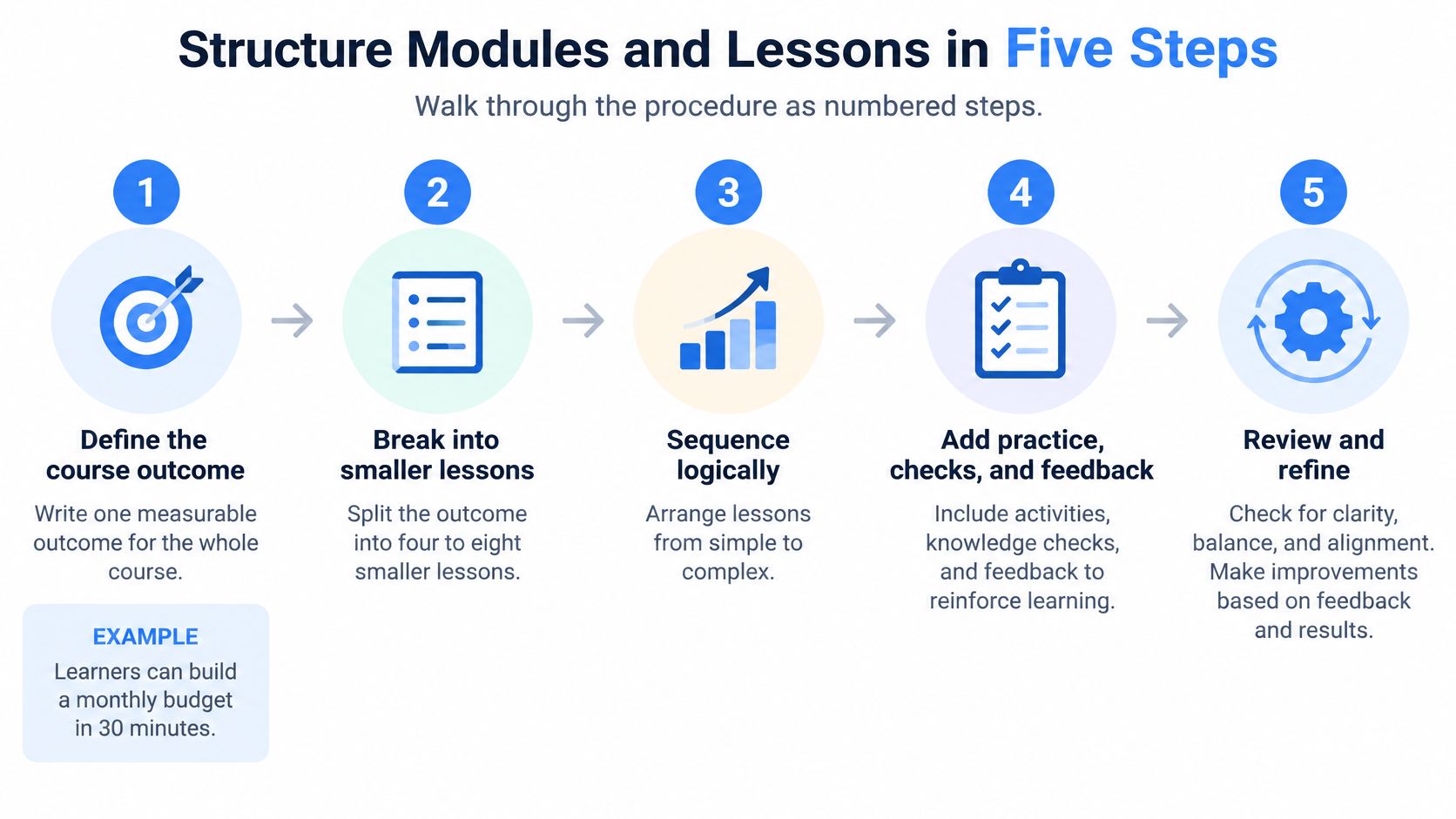
A course outline should represent the learner's path to an outcome, not the number of files you already have. Start with the change a buyer should be able to make, then divide that work into manageable pieces.
- Write one measurable course outcome. For example, “learners can build a monthly budget in 30 minutes” gives you a result you can use to decide what belongs in the course. A broad promise such as “understand personal finance” doesn't tell you what learners should do.
- Divide the outcome into four to eight modules. Each module should teach one skill a learner can apply independently. If you have dozens of possible topics, sort them by what a learner must know first and what they can safely skip.
- Break each module into three to eight lessons. Give each lesson one objective and one main idea, and plan for about five to fifteen minutes of video or reading. Short lessons are easier to revisit and make it easier to spot where a learner gets stuck.
- Sequence the lessons by dependency. Teach foundational ideas before tasks that rely on them, then finish each module with a brief recap and one action. Learners should be able to tell what to do next without guessing.
- Map the sequence and total the workload. Put modules, lessons, objectives, assessments, and estimated time in a spreadsheet. Check that the course's actual workload supports the promise on the sales page.
A 40-module outline usually signals a planning problem, not a need for a bigger platform. Merge repeated topics, move optional background material into a resource, or split a broad promise into separate products. If you're adapting notes or existing materials, turn existing content into digital products with AI, then edit the result so each lesson serves a specific learner task.
| Course type | Modules | Lessons per module | Lesson length |
|---|---|---|---|
| Mini course | 3–4 | 3–5 | 5–10 minutes |
| Standard self-paced course | 5–8 | 4–8 | 8–15 minutes |
| Cohort course | 6–10 | 3–5 | 10–20 minutes, plus a live session |
These are planning ranges, not rules. A short product may need fewer lessons, while a technical skill may need more practice than explanation. Ask one person from your intended audience to walk through the map and explain the course outcome after the first module. If they can't name what they'll be able to do, revise the module before building the rest.
Set Objectives and Pacing That Keep Learners Moving
A lesson objective should describe an action the learner can demonstrate. Choose a verb such as build, explain, or apply, then make sure the lesson contains the instruction needed to do it. “Know how budgeting works” is hard to assess. “Build a monthly budget from a list of income and expenses” gives learners a visible target.
Choose pacing based on how the material is used. Open access suits reference content people may want to revisit. Weekly release can give a longer self-paced course a steady rhythm. A scheduled cohort can help when learners need live feedback or peer accountability.
The completion figures are useful as directional evidence, not promises. A study covering 1.3 million enrollments reported completion of 41.9% for open-access self-paced courses and 53.4% for scheduled cohorts; courses with assessments reached 59.1%. Across 221 MOOCs, completion ranged from 0.7% to 52.1%, with a 12.6% median, and longer courses generally performed worse, according to the MOOC completion study. These results don't establish what a paid course will achieve: definitions, audiences, course design, and observation windows differ.
Activate learners early. Require one meaningful action in the first week, such as completing the opening lesson or submitting a short task. Add lesson-level discussion or a peer check when interaction helps learners practice, but don't add a community feature just to make the course feel more substantial.
Measure the path, not just the finish line: Track purchases, learners who start, and learners who complete. Compare the same time window and use the same definition of completion.
Email can help you reach buyers who haven't started. Genesize's Creator plan includes an AI Growth Agent, customer tags and audience segments in its CRM, and email campaigns with automated follow-ups. Use those tools to identify a missed first lesson and send a concise reminder with a direct link back to it.
As a practical starting rule, release a short course all at once when learners are likely to use it as a reference. For a longer course, consider releasing one module per week, then check whether learners are progressing or waiting for content. The appropriate pacing is the one that supports the task without holding back material learners need now.
Assignments and Quizzes That Show Real Progress
Match the assessment to the action in the lesson objective. A quiz can check whether learners recognize terms or understand a process. An assignment is better when they need to produce something, make a decision, or demonstrate a skill.
For recall, try a short quiz at the end of a module. Keep the questions focused on the key ideas, set a clear pass mark, and allow retakes when the purpose is practice. When learners miss a question, point them to the relevant lesson instead of showing only a score. That turns a failed attempt into a useful route back through the material.
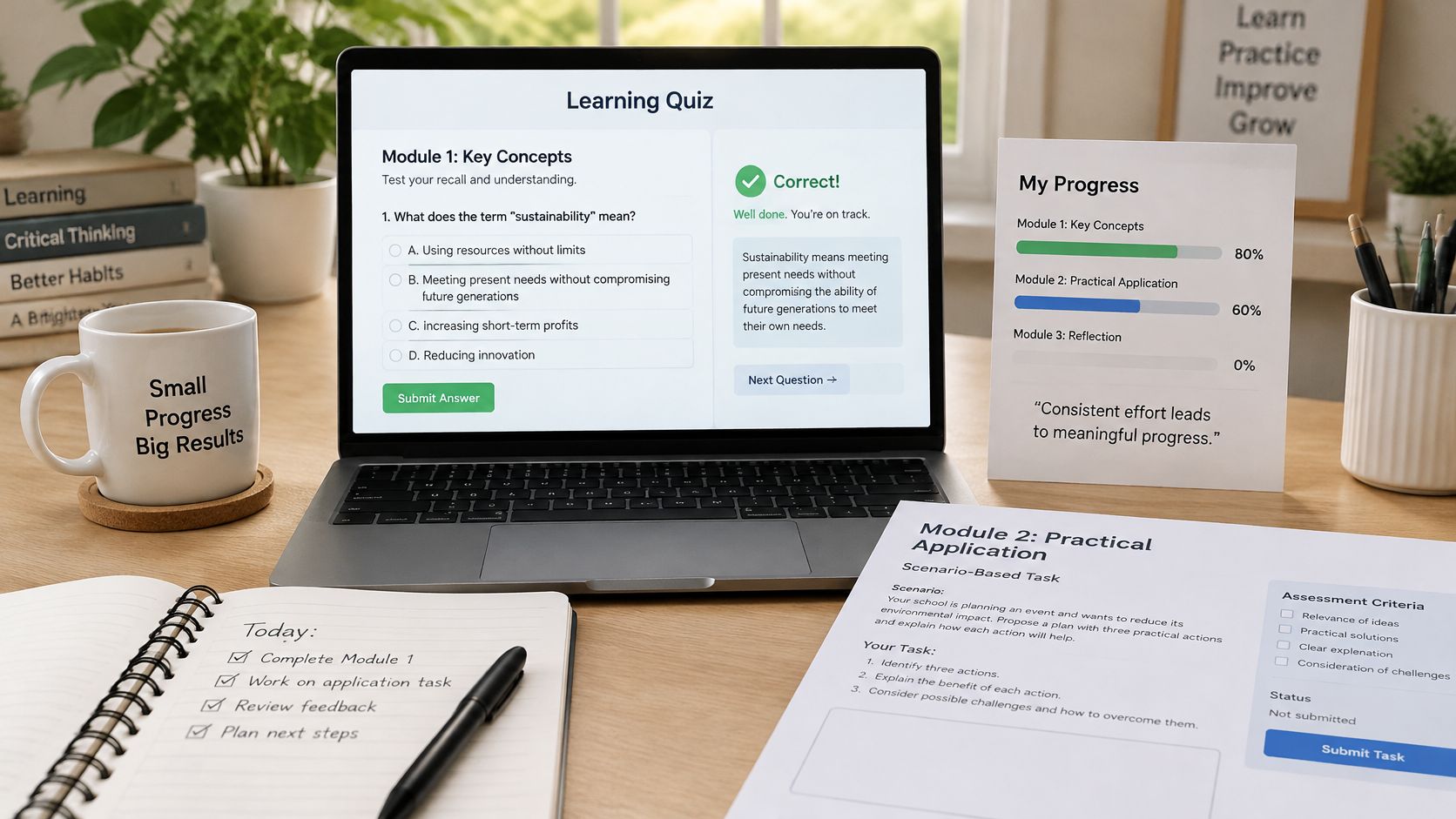
For an application outcome, require a tangible piece of work: a completed template, a worked example, or a short recording. In a cohort, peer review can help learners compare approaches. Give reviewers a simple rubric and a clear instruction about what useful feedback looks like.
Consider a budgeting course. A quiz in the module on expenses could ask learners to distinguish fixed costs from variable costs. The assignment could ask them to build a budget from their own spending for the previous month. The quiz checks understanding; the budget shows whether the learner can apply it.
One assessment per module is a practical default, not a requirement to test every lesson. Testing each lesson can add grading work and interrupt the learning flow, while a recall-only quiz won't prove that someone can perform a skill. For a longer course, a final project can bring several module outcomes together.
Before launch, check two things: each course outcome has at least one assessment, and each assessment points back to the lesson that teaches the skill. If learners can't tell what to practice after a weak result, the feedback loop needs work. If an assignment asks them to do something the course never taught, fix the lesson sequence before opening enrollment.
Accessibility Checks Before You Publish
A file that downloads successfully can still be unusable for someone with a disability. Accessibility is easy to overlook when comparing platforms, yet it affects the lesson documents, videos, assessments, and exports learners use. The AbilityNet accessibility report describes workflows involving structure, alt text, captions, keyboard navigation, readable PDFs, contrast, transcripts, and screen-reader testing. It also cautions that automated checks don't guarantee functional accessibility, so human review remains important.
Use this checklist before publishing:
- Structure headings clearly. Use a logical heading order in every lesson document so readers can move through sections.
- Add useful alt text. Describe the purpose or information in each image. Decorative images shouldn't create unnecessary screen-reader noise.
- Caption videos and provide transcripts. Check that captions match what the speaker says and that the transcript includes information conveyed visually.
- Check exported documents. Make PDFs readable and structured, and review Word files for heading order and image descriptions. Genesize lets users edit, change the design of, and export product files by hand, which allows corrections before distribution.
- Review contrast and keyboard access. Confirm that text is readable against its background and that learners can move through lessons and assessments without a mouse.
- Test a complete lesson with a screen reader. Follow the same route a learner would take, including the instructions and any assessment.
Automated checks can flag problems, but they can't reliably judge whether an image description makes sense or whether a lesson is understandable when read aloud.
Choose the delivery format early. Text-based lessons generally have fewer moving parts than video courses, while video requires attention to captions and transcripts. Assign one person to sign off the accessibility checklist before each launch, and correct the exported files by hand where needed. A high automated score isn't a substitute for testing the actual learner experience.
Confirm Your Structure Before Choosing a Platform
Write a one-page course map before opening platform trials. Include the outcome, module and lesson plan, estimated lesson lengths, assessments, pacing, and the person responsible for accessibility review. This turns a platform demo into a test of your actual course rather than a tour of features.
Run a learner walkthrough of the map. Ask someone from your audience what they expect to be able to do after the first module, where they would practice, and what they'd do if they got stuck. Use the answers to fix unclear instructions and missing feedback before building the course.
Then compare each shortlisted platform against the map. Can it release modules on your schedule? Can it deliver the quizzes or assignments you need? Can you identify buyers who haven't started and follow up? Can you export the files for correction? For broader evaluation criteria, use this guide to choose software for digital products. Recalculate the annual cost using your likely sales volume, not just the entry subscription.
With Genesize, new customers can start one 14-day trial on any plan, and a payment method is required. You can build a sales page, connect Stripe, and keep the product private while checking its content and buying steps. Buyers can access what they purchase without paying for their own Genesize plan.
Test the complete buyer path before launch: open the sales page, go through checkout, confirm that the product stays private until you're ready, and check what a buyer receives after purchase. The best choice is the platform that fits your course map and modeled cost, then passes that end-to-end test.
Genesize brings digital-product creation, storefront, checkout, email, and customer management into one workspace, with no cut taken from product sales. If you're comparing Kajabi alternatives for an ebook, course, or sales funnel, visit Genesize to explore the workflow and start a trial.