How to Build an Ebook: From Outline to Export in 2026
Learn how to build an ebook from outline and draft to editing, cover design, EPUB and PDF export, and distribution.
You've got the knowledge in scattered notes, old emails and half-finished documents, and you've probably got a polished PDF in mind as the finished product. That's where most first ebooks stall. The writing isn't the hardest part. The build order is. When you learn how to build an ebook in the right sequence, you edit before you style, you test the export before you sell it, and you don't discover broken links from a buyer.
The Ebook Build Sequence at a Glance
| Stage | Output | Done when |
|---|---|---|
| Pick topic and reader | One-sentence promise | You can name the reader, the problem and the result |
| Outline chapters | Chapter list with reader outcomes | Each chapter answers one specific question |
| Draft from notes | Full manuscript version 1 | Every chapter traces back to source notes |
| Developmental and copy edit | Revised manuscript | The argument and sequence hold on a full reread |
| Layout and cover | Styled source file and cover image | Headings, links and images look right on a phone |
| Export and preflight | EPUB, PDF and DOCX files | Files pass device and accessibility checks |
| Publish and deliver | Live product and buyer download | A test purchase receives a file that opens |
One rule sets that order. Edit the words before you style them. A paragraph you cut after layout doesn't just shorten a chapter. It shifts page breaks, strands the next heading at the foot of a screen, and can break the anchors your table of contents points to. Fix the text first, then freeze it and design around a stable manuscript.
Production also stalls because one person usually holds every job. You're the expert, the writer, the editor, the cover designer and the tester. That doesn't make the book impossible. It means you need separate passes with separate finish lines, so you aren't trying to judge argument, spelling and screen layout in the same read-through.
Your First Week
Don't try to finish a chapter in week one. Get the structure in place.
- Write the promise: One sentence naming the reader, problem and result.
- List chapter outcomes: Ten outcomes is a practical starting point, one per chapter.
- Gather source notes: Put the notes, examples and past writing for each chapter in one folder.
- Create a versioned file: One working manuscript, saved with a date each time you finish a pass.
- Get one outside read: Ask one person in your intended audience to read chapter one and tell you where they got lost.
If you can't name the reader and the result in one sentence, you don't have a book yet. You have a topic.
Define the Reader and Promise Before You Draft
A useful starting point for planning your workspace and material is shown below.
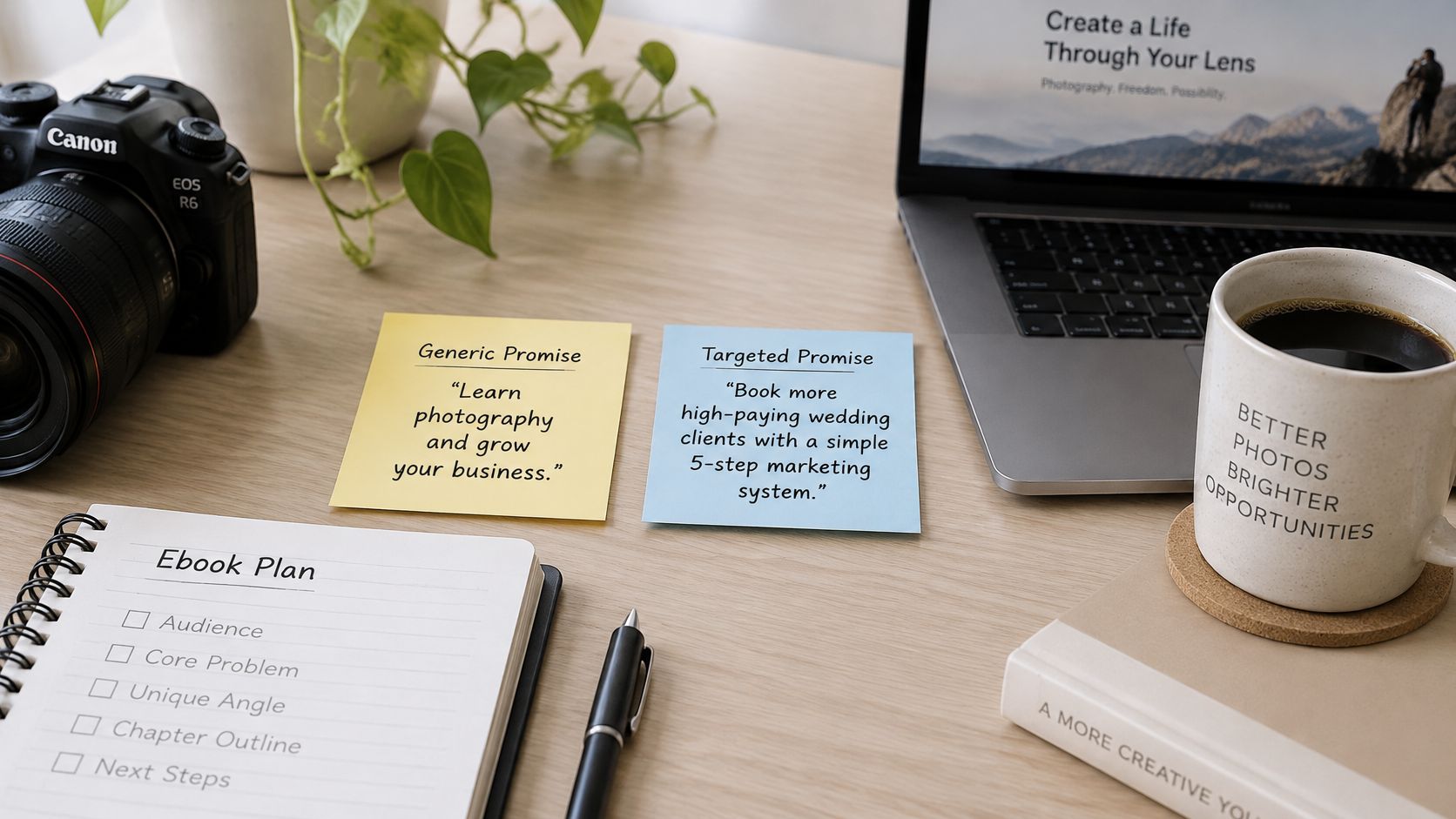
Compare two promises. "Learn photography" could mean exposure basics, wedding posing, editing, or running a studio, so nobody knows if it's for them. "Help a freelance photographer price wedding packages in one weekend" names the reader, the job and the timeframe. The second book is shorter to write, easier to outline and far easier for a buyer to justify.
That sharpness matters because the category isn't empty. In March 2025, U.S. eBook trade sales totaled $87 million, representing 12% of total trade sales, according to the Association of American Publishers figures compiled in this ebook statistics roundup. A market that size rewards a specific, useful book. It doesn't reward a generic one just because the file format is digital.
A narrow topic also gives you more than one product from the same work. The core manuscript can become a printable worksheet, a short email series, an audio companion, or a small course, because every chapter already ends in an outcome the reader can act on.
Three Checks Before You Commit
- Search the exact problem: Look for existing titles using the words your reader would type, not your professional jargon.
- Read competing reviews: Note the complaints buyers repeat, especially missing steps and advice that doesn't fit their situation.
- Ask ten likely readers: Put the outcome to people in your audience and ask whether they'd pay for that result. Follow the method in this guide to validating a digital product idea before you build it so politeness doesn't count as demand.
The short video below walks through the positioning decision in practice.
You're done with this stage when the promise fits in one sentence under 25 words and names the reader, the problem and the result.
How to Outline and Draft From Your Own Notes
Draft from material that's already yours. A freelance bookkeeper writing a chapter on home-office expenses doesn't need a blank page. Her client intake notes supply real categories and mistakes, her past emails supply explanations she's already tested, and her own rules supply the advice. That provenance is what keeps the book from sounding like anyone else's.
The Drafting Steps
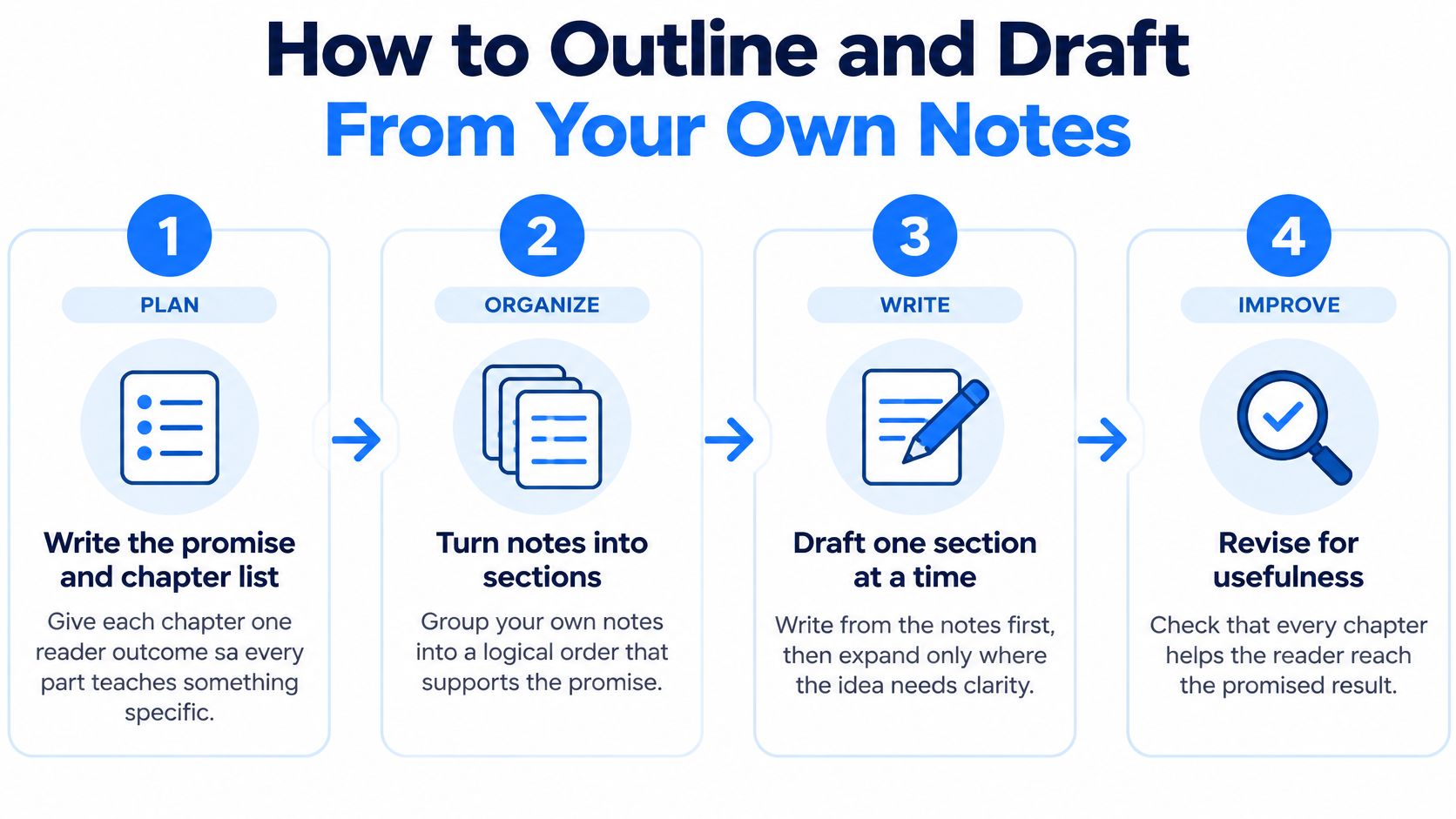
- Write the promise and chapter list: Give each chapter one reader outcome. A chapter that doesn't teach something specific becomes filler you'll cut later.
- Gather your source folder: Pull notes, client examples, past emails and writing samples into one place, grouped by chapter. This is the same raw material you'd use when turning existing content into digital products with AI, and it's what makes the draft sound like you.
- Draft one chapter per sitting: Write from that chapter's notes, not from memory. If an example is missing, flag the gap. Don't invent a client story to fill it.
- Mark every claim that needs a source: Highlight numbers, dates, legal points and product claims as you write, while you still know where they came from.
- Label AI help by type: Tag passages in your source file and note the use. Brainstorming, transcription, structural editing, translation and factual drafting don't carry the same risk, so they shouldn't get the same label.
- Verify and record your changes: Check each marked claim against its source, rewrite anything you can't stand behind, and keep a short note of what you changed and why.
For the bookkeeper, step four means her expense rules get checked against current guidance before they become advice, and step three means the worked example comes from a real intake form with names removed.
Deciding What to Disclose
Tutorials that tell you to draft with AI usually skip disclosure. The evidence shows a gap between what people say and what they do. A 2025 study of digital-humanities researchers found respondents viewed disclosure as important, yet actual disclosure remained low and opinions differed over which uses require disclosure, and a separate review of 3,384 articles found only 4.2% included formal disclosure of generative-AI use, as reported in the ACM study on disclosure of AI use.
Use a practical test instead of guessing. Add a plain-language AI-use note when the assistance changes what a buyer reasonably expects, such as AI-drafted examples or synthetic illustrations. Transcribing your own interview is a different matter. Keep the internal labels either way, so you can answer truthfully if a reader asks.
Lay Out the Book and Design the Cover
Lay out the approved manuscript in your structured source file. Don't design inside a finished PDF, because every later correction then has to be made twice.
- Apply heading styles properly: Use the chapter title as the top level and sections below it. If you use real styles instead of bold text made bigger by hand, your table of contents builds itself and stays accurate.
- Keep body text reflowable: Remove fixed line breaks and manual spacing used to fake gaps. Never place words the reader needs inside an image, where they can't resize or be read aloud.
- Insert images with purpose: Add alt text and captions, then view each image at phone width. A chart that's legible on a monitor often turns into grey smudge on a small screen.
- Check font licences: Choose a font only if its licence allows embedding in an ebook, and record that licence in your preflight notes. An unlicensed font gets substituted on export and your layout shifts without warning.
- Build front matter in order: Title page, copyright and rights notice, contents, then chapters. Readers and reading apps both expect that sequence.
Designing for the Thumbnail
Your cover will mostly be seen small, in a search list or on a phone. The title and author name must stay readable at thumbnail size, with one clear image or colour field behind them and no small print doing important work. Shrink the design on your own screen until it's the size of a list item. If you have to squint, buyers won't bother.
Use exactly the same title and author spelling on the cover as you'll enter in the metadata. Mismatches cause rejections and confused buyers. Keep the cover as a separate file from the text, so you can replace a weak cover later without reopening the chapters.
You're finished when the layout reads cleanly on a phone and the cover still works when it's tiny.
Review Passes That Catch Errors Before Layout
| Pass | Reviewer | Catches |
|---|---|---|
| Subject check | Expert or trusted reader | Wrong facts, weak examples, missing steps |
| Developmental edit | Editor or author after a break | Chapters out of order, repeated points, unclear argument |
| Copyedit | Copyeditor | Grammar, spelling, inconsistent terms |
| Accessibility review | Reviewer using a screen reader | Missing alt text, unlabeled links, weak heading structure |
| Device test | Author on three screens | Broken anchors, stranded headings, missing images, malformed links |
Timing matters as much as the list. The subject check, developmental edit and copyedit run on the manuscript, before layout. The accessibility review and device test run on the exported files, because that's where those defects live. If a device test fails, go back to the source file and re-export. Never patch the export by hand, or your next export will undo the fix.
The bottleneck is predictable. A 2025 survey cited by Barker Books in its guide to book production found 94% of authors self-published, 68% edited their own books, and 57% designed their own covers. When one person writes, edits, designs and checks the same pages, they read what they meant to write. That's why each pass above names a different reviewer, even if the developmental pass is just you after a genuine break from the draft.
Version Control That Prevents Chaos
Keep one source file and save a dated copy after each pass is signed off. Name copies by stage, not by vague labels like "final" or "final2". You'll always know which version the copyeditor approved and which one went to layout.
Practical rule: A clean source document proves nothing. Font substitution, broken anchors, orphaned headings, missing images and malformed links frequently appear only after export, so judge the file your buyer will open.
You're done when each pass has a signed-off version and the exported file opens without errors on the device your buyers use most. If you don't know that device, test a phone first.
Choose Formats and Test Accessibility
| Format | Best for | Main risk |
|---|---|---|
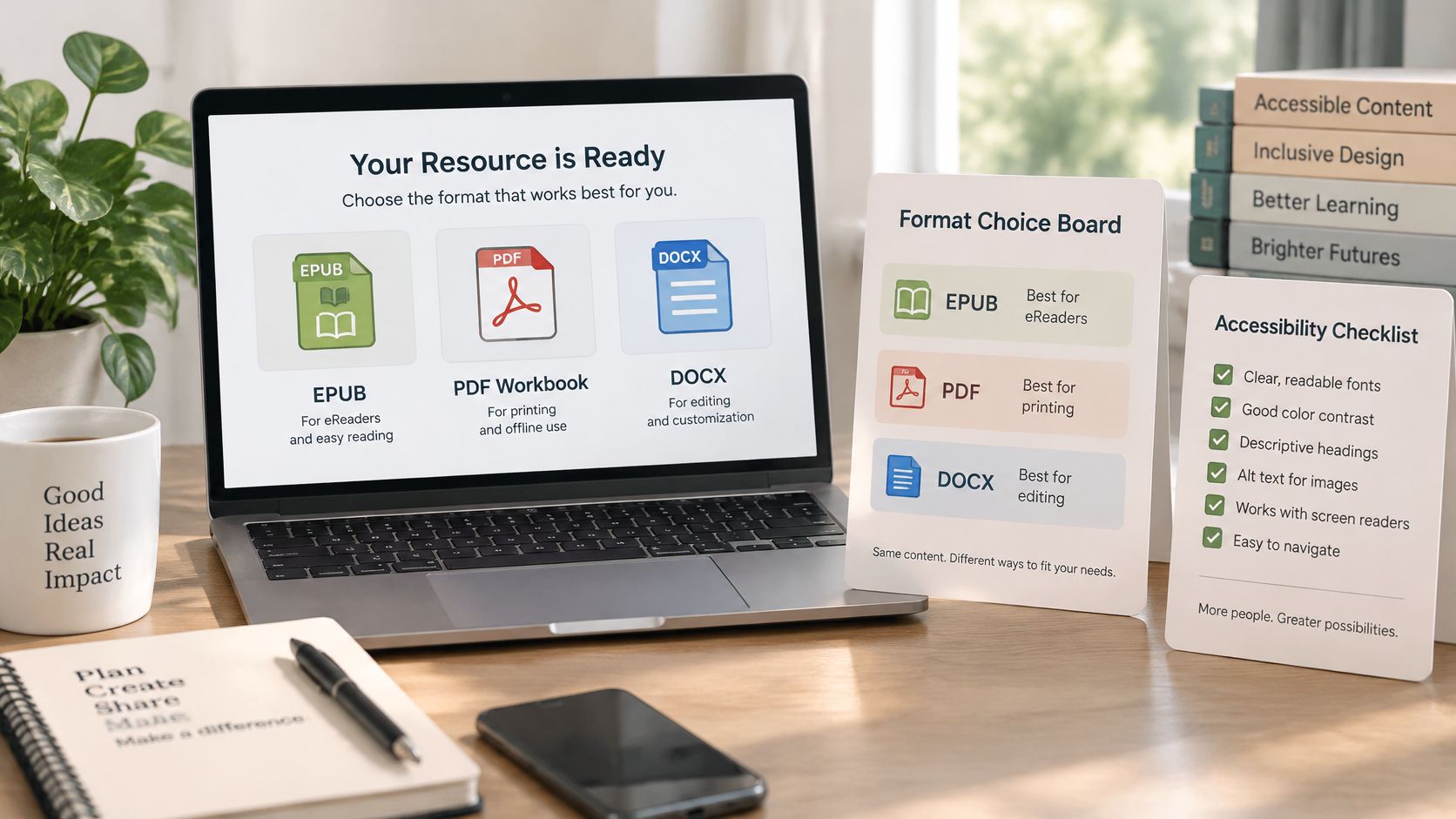
| EPUB (reflowable) | Phone and e-reader reading, screen readers | Hard-coded page layouts and image-only text break reflow |
| PDF (fixed layout) | Print-ready copies, workbooks, sharing | Fixed pages read poorly on small screens and tags are often missing |
| DOCX | Editing by collaborators, conversion to other formats | Styles lost when headings are formatted by hand |
| HTML web pages | Free downloads and lead magnets | Needs hosting and a clear table of contents |
| Audio companion | Listeners and commuters | Needs narration rights and a separate production pass |
Build the reflowable EPUB as your master, then derive the PDF from the same structured source. A PDF can look more polished on your monitor because every page sits exactly where you put it. On a phone, that fixed page forces the reader to pinch and scroll sideways, and assistive technology often can't find a sensible reading order in an untagged file. Reflowable text adapts to the screen, the font size and the reader's own settings.
This isn't a fringe concern. France's media regulator reported that more than 45,000 ebooks were published in 2025, while 14% of ebook or audiobook users rely on software that makes reading easier for people with dyslexia and related conditions, according to Arcom's overview of ebook accessibility in 2025. Those readers are buyers you either include by design or lock out by accident. You're also responsible for the accessibility of products you publish and sell, whichever platform handles the checkout.
The screenshot of common format options below shows why the choice belongs in the build, not after it.
Acceptance Tests Before Release
Treat these as a release gate, not a polish list.
- Reflow test: The book reflows at a viewport equivalent to 320 CSS pixels without loss of information or readability, as set out in the W3C EPUB Accessibility specification.
- Text enlargement: Increase the font size in a reading app and confirm lines rewrap instead of clipping or overlapping.
- Heading structure: Use headings alone with a screen reader to find content. The chapter order should make sense without seeing the page.
- Alt text and contrast: Every informative image has a description, graphics don't rely on colour alone, and text has sufficient contrast against its background.
- Navigation and metadata: The table of contents is clickable and keyboard accessible, links are labeled with meaningful text, and language and accessibility metadata are present.
Run automated EPUB and accessibility checks first, then inspect every chapter manually in portrait and horizontal orientations. Automated tools catch missing alt text. They won't tell you the alt text is useless.
Run Preflight and Pick Your Sales Path
The Five-Step Preflight
- Confirm metadata: Check title, author and language fields, and add an ISBN where your sales channel requires one.
- Click every contents entry: Follow each table-of-contents link and internal cross-reference in the exported file, not the source.
- Check images and fonts: Confirm image resolution and alt text, and verify your font licences allow embedding.
- Test links and file size: Open every hyperlink and check the file size against your channel's limit before upload, not after rejection.
- Buy your own product: Complete a test purchase on a phone and a laptop, then confirm the download arrives and opens on both.
Here's the kind of sales setup you'll be checking during that test.
| Path | Gains | Costs |
|---|---|---|
| Marketplace | Built-in discovery and reach | Platform fees and limited customer data |
| Hosted storefront | Own checkout and pricing control | Setup and fees vary by provider |
| Own website with payment link | Full control of price and customer data | You drive all traffic and handle delivery |
Discovery deserves as much thought as checkout. In 2024, the global eBook market was valued at approximately $14.6 billion, according to Statista's e-reader and ebook topic page. Buyers exist in large numbers, but so do competing titles, which is why the comparison in this guide on where to sell ebooks is worth reading before you commit.
On a hosted route like ours, you can build a sales page, connect a Stripe account and check the buying steps before going live, keep the product private while you test it, and we take no cut of your product sales. Whichever path you pick, refund terms, taxes, accessibility and fulfilment stay your responsibility.
Choose the path, set the price, and run that test purchase before you share the link with anyone.
Turn your notes and expertise into a finished ebook, lay it out, and connect it to a storefront and checkout in one workspace with Genesize. Keep your product private while you run your preflight and test purchase, then publish when the file your buyer receives is the file you've checked.